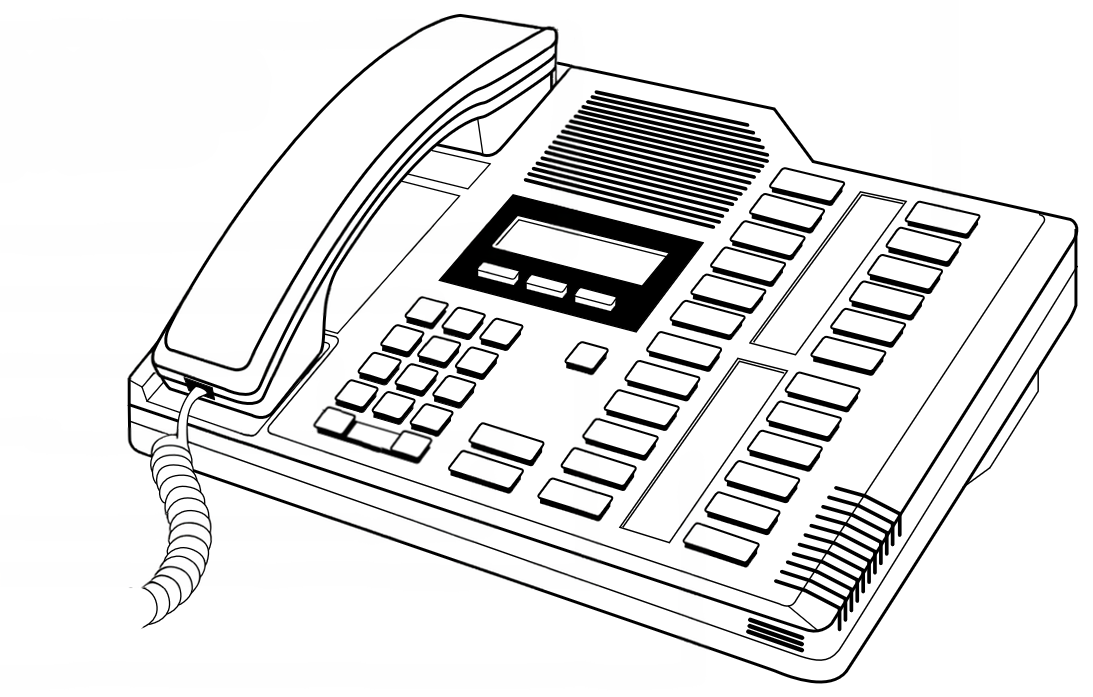
Northern Telecom product illustration
|
|
M7324
M-Series · 24-Button Attendant Set
The M7324 is the flagship model of the Norstar M-Series telephone family and
the standard choice for receptionists, attendants, and operators throughout
a Norstar installation. Its 24 fully programmable buttons provide enough
capacity to monitor every line and extension on most small-to-medium systems
at a glance, while optional CAP and DSS add-on modules extend that coverage
further without requiring a second telephone.
| › |
24 programmable line / feature buttons |
| › |
2-line, 16-character alphanumeric display |
| › |
Accepts CAP and DSS add-on modules |
| › |
Compatible with all Norstar KSU platforms |
| › |
Available in Charcoal and Almond |
| › |
KSU loop-powered — no external power supply |
|
| Model Number |
M7324 |
| Series |
Norstar M-Series |
| Programmable Buttons |
24 — arranged in three columns of eight, configurable as line appearances, intercom keys, speed dial, Answer DN, or feature access |
| Display |
2-line × 16-character alphanumeric LCD |
| Display Navigation Keys |
3 keys positioned below the display for scrolling through call information, feature options, and directory entries shown on screen |
| Fixed Keys |
Release (red), Feature (red), Hold (red), Volume Up, Volume Down, dial pad (0–9, *, #) |
| Message Waiting |
LED indicator illuminated by KSU when voicemail or a message is waiting at this extension |
| Handset |
Standard NT digital handset with coiled cord |
| Speakerphone |
None — handset operation only |
| Ringer |
Adjustable volume and tone (programmable via Feature 1) |
| Station Connection |
Single pair, standard Norstar digital station port (RJ-11 / RJ-45 to 25-pair distribution) |
| Power |
Loop-powered from KSU over station pair — no local AC adapter required |
| Max. Station Cable Run |
Up to 300 m (1,000 ft) on 24 AWG solid copper — see Wiring Reference for full distance table |
| Add-on Modules |
CAP (Central Answering Position) module and DSS (Direct Station Select) module — see Add-on Modules section below |
| Colour Options |
Charcoal (standard), Almond |
| Desk Stand |
Integrated tilt stand, two positions |
| Wall Mountable |
Yes — handset retainer clip reversible for wall-mount orientation |
| KSU Compatibility |
Norstar 3x8, 6x16, Compact ICS (all versions), Integrated ICS, Modular ICS |
| Interoperability |
Fully interchangeable on same system with M7100, M7208, M7310, T7100, T7208, T7316, T7316e, T7406 |
| Approx. Dimensions |
269 mm × 234 mm × 90 mm (W × D × H with stand) |
| Approx. Weight |
Approx. 1.2 kg (set only, without module) |
| Key and Button Reference |
|
| Key / Button |
Type |
Function |
| Buttons 1–24 |
Programmable |
Arranged in three columns of eight buttons. Each button is independently assignable as a line appearance, intercom (DN) key, Answer DN, speed dial, or feature shortcut. Each has a dual-LED indicator (red/green) showing real-time line and call state. Button labels are written on paper inserts fitted beneath the transparent overlay on the button panel. |
| Display |
LCD |
2-line × 16-character alphanumeric. Shows caller ID (where available), extension names, call timer, feature status, and system prompts. The upper line typically shows caller or line information; the lower line shows elapsed time or contextual options. |
| Display Nav Keys |
Fixed × 3 |
Three keys positioned directly below the display. Used to scroll through call information, names in the system directory, and options shown on the lower display line. Also used to navigate forward and backward through Norstar feature and programming menus without entering codes manually. |
| RLS (Release) |
Fixed — red |
Ends the active call and releases the line. Also exits feature programming menus without saving. Equivalent to replacing the handset. |
| Feature |
Fixed — red |
Activates feature code entry mode. Press Feature followed by the feature code number. Also the entry point for all user-level and System Coordinator programming (Feature ** + password). |
| Hold |
Fixed — red |
Places the active call on exclusive hold at this set. The held line button flashes to indicate hold status. For system hold (retrievable by any set), use Feature 83. |
| Volume ▲ / ▼ |
Fixed × 2 |
Adjusts handset receive volume during a call. Outside a call, adjusts the ringer volume. Volume settings are saved per call type. |
| Dial Pad |
Fixed |
Standard 12-key touchtone pad (0–9, *, #). Used for dialling, feature code entry, extension name programming (alpha multi-tap), and navigating menus. |
| MSG Indicator |
LED |
Steady red light indicates a new message waiting in the voicemail mailbox assigned to this extension. Press Feature 65 to retrieve messages. |
| |
Button labelling: The M7324’s 24 button positions are identified using
a paper insert card that slides beneath the transparent plastic overlay on the button panel.
A blank template for recording button assignments is available — see
M7324 Quick Reference Guide.
When CAP modules are attached, each module has its own separate label insert.
|
| Add-on Modules — CAP and DSS |
|
The M7324 is the only Norstar M-Series set that accepts add-on button modules. Modules attach
directly to the right side of the telephone and connect via the module port on the set’s
rear panel. Up to two modules may be chained together, providing an operator console with
up to 72 monitored buttons in total (24 on the set + 24 per module).
|
CAP Module — Central Answering Position
|
|
[ CAP Module
Illustration ]
|
|
|
The CAP (Central Answering Position) module adds 24 additional programmable
buttons to the M7324, each with its own dual-LED indicator. This allows a receptionist
or attendant to monitor and answer calls for a larger number of lines and extensions
than the base telephone alone can accommodate.
Each CAP button can be assigned as a line appearance or Answer DN in exactly the
same way as the buttons on the base M7324. The CAP module has its own paper label
insert under a transparent overlay. When a second CAP module is attached, it connects
to the module port on the first CAP, forming a chain.
| Buttons per module: |
24 |
| Max. modules per set: |
2 (for a total of 72 buttons) |
| Button indicators: |
Dual-LED (red / green) per button |
| Power source: |
Drawn from the base M7324 station loop |
|
|
DSS Module — Direct Station Select
|
|
[ DSS Module
Illustration ]
|
|
|
The DSS (Direct Station Select) module also adds 24 programmable buttons,
but its primary purpose is monitoring and directly dialling extensions within
the system. Busy/idle/ringing status for each monitored extension is shown in
real time via the per-button LED, giving the attendant an at-a-glance view of
the entire floor or department.
A DSS button press while the set is idle initiates an immediate intercom call
to the assigned extension. During an active call, pressing a DSS button initiates
a transfer to that extension with a single keystroke. This makes the DSS module
the preferred choice for operators handling high call volumes in a busy office.
| Buttons per module: |
24 |
| Primary use: |
Extension monitoring and one-touch transfer |
| Button indicators: |
Dual-LED showing extension busy / idle / ringing |
| Power source: |
Drawn from the base M7324 station loop |
|
| |
Typical attendant configuration: For a site with up to 8 lines and
16 extensions, the base M7324 alone provides enough buttons to monitor all trunks
and extensions simultaneously. Larger sites — or those where the operator must
transfer calls quickly by name — typically pair the M7324 with one CAP module
(line appearances) and one DSS module (extension directory), giving the attendant
72 monitored points from a single desk position.
The CAP Module User Guide
covers installation and programming of both module types.
|
Photographs of the M7324 in charcoal and almond finish, with CAP module, DSS module, button label card detail, and attendant desk configuration.
[ Photograph — Front View ]
M7324 Charcoal — front
three-quarter view
|
|
Front view — charcoal finish
|
[ Photograph — Front View ]
M7324 Almond — front
three-quarter view
|
|
Front view — almond finish
|
[ Photograph — With CAP Module ]
M7324 with single CAP
module attached
|
|
M7324 with CAP module
|
[ Photograph — With DSS Module ]
M7324 with DSS module
showing extension status LEDs
|
|
M7324 with DSS module
|
[ Photograph — Button Detail ]
24-button panel showing
label insert and LEDs
|
|
Button panel and label insert detail
|
[ Photograph — Rear Panel ]
Rear showing line cord socket,
module port, and stand positions
|
|
Rear panel — connectors and module port
|
| Documentation |
|
| Document |
Type |
Open |
| Norstar M7324 User Card |
User Card (NT original) |
Open PDF |
| Norstar M7324 Quick Reference Guide |
Quick Reference |
Open PDF |
| CAP Module User Guide |
User Guide |
Open PDF |
| MCAP User Card |
User Card |
Open PDF |
| CICS 7.0 System Coordinator Guide |
System Coordinator |
Open PDF |
| Norstar Feature Code Quick Reference |
Reference Page |
Open Page |
| |
Related M-Series Telephone Sets:
M7100 — single-line, 1-line display ·
M7208 — 8 buttons, 1-line display ·
M7310 — 10+10 buttons, 2-line display, display nav keys ·
M7324 — 24 buttons, 2-line display, CAP/DSS-capable
|
|
|