| Everyday Call Features |
|
| Feature |
Code |
Description |
| Ring Again |
Feature2
Cancel: Feature#2
|
Monitor a busy or unanswered telephone or line pool. Notifies you when it becomes available. |
| Conference |
Feature3
|
Establish a 3-party conference. Put first call on hold, make second call, then press Feature3 and press the held line button to join. |
| Call Forward |
Feature4
Cancel: Feature#4
|
Forward your calls to another telephone in the Norstar system. |
| Last Number Redial |
Feature5
|
Automatically redial the last external telephone number you dialed. |
| Transfer |
Feature70
|
Send a call to another telephone in the system or externally. Announce, then press Rls to complete. For blind transfer, hang up immediately after dialing. |
| Call Duration |
Feature77
|
Briefly display the approximate length of your current or most recent call. |
| Voice Call |
Feature66
|
Make a voice announcement through another Norstar telephone’s speaker without ringing it first. |
| Priority Call |
Feature69
|
Interrupt a person on a call or in Do Not Disturb. That person can press Feature85 to block priority calls. |
| Camp-on |
Feature82
|
Re-route a call to another telephone even if all its lines are busy. Press, then dial the extension number. |
| Saved Number Redial |
Feature67
|
Save a number while on a call to redial later. Enter again when not on a call to redial it. |
| Messages |
Feature1
Cancel: Feature#1
|
Send a callback message to another display telephone. To view messages: Feature65. Press 0 to return the call. |
| Hold, Park & Pickup |
|
| Feature |
Code |
Description |
| Hold |
Hold
|
Temporarily suspend a call. To retrieve, press the button next to the flashing indicator (press Hold on the M7100). |
| Exclusive Hold |
Feature79
|
Hold a call and prevent other telephones from picking it up. |
| Call Park |
Feature74
|
Park a call for retrieval from any telephone in the system. Note the 3-digit code shown on the display. To retrieve: press Intercom and dial the retrieval code. |
| Call Pickup — Group |
Feature75
|
Answer a call ringing at another telephone in your pickup group. The longest-ringing external call is answered first. |
| Call Pickup — Directed |
Feature76
|
Answer any ringing telephone. Press, then dial that telephone’s extension number. |
| Trunk Answer |
Feature800
|
Answer an external call placed in a Ringing Service schedule from any telephone. Does not work for private lines. |
| Call Queuing |
Feature801
|
Answer the next waiting call. External calls take priority over callback, camped, or transferred calls. |
| Group Listening |
Feature802
Cancel: Feature#802
|
Use both the receiver and speaker simultaneously on a call. Keep receiver away from speaker to avoid feedback; press Rls to hang up. |
| Do Not Disturb & Privacy |
|
| Feature |
Code |
Description |
| Do Not Disturb |
Feature85
Cancel: Feature#85
|
When not on a call: prevents all incoming calls except priority calls from ringing. When on a call: blocks an incoming priority call. |
| Voice Call Deny |
Feature88
Cancel: Feature#88
|
Prevent your telephone from receiving voice call announcements through its speaker. |
| Name & Number Blocking |
Feature819
Cancel: Feature#819
|
Block your outgoing name and/or number on a per-call basis. Requires CLID service from your telephone company. |
| Line Redirection |
Feature84
Cancel: Feature#84
|
Redirect calls arriving on an external line to a telephone outside your Norstar system. Not available on M7100. Some lines may not support this feature. |
| Paging & Intercom |
|
| Feature |
Code |
Description |
| Internal Page |
Feature61 + zone
|
Page through Norstar telephone speakers. Zones: 1, 2, 3, or None (all). Announcements time out after a pre-set interval. |
| External Page |
Feature62
|
Page through an external loudspeaker system. |
| Internal & External Page |
Feature63 + zone
|
Page through both Norstar telephone speakers and an external loudspeaker simultaneously. |
| Page (code + zone) |
Feature60 + code + zone
|
Select page type by code (1=internal, 2=external, 3=both) and zone (1, 2, 3, or None). |
| Speed Dial & Dialing Tools |
|
| Feature |
Code |
Description |
| Speed Dial |
Feature0 + 2-digit code
|
Dial a stored number using a 2-digit code. System codes 01–70 (set by Sys. Coordinator, any telephone). Personal codes 71–94 (your telephone only). |
| Line Pools |
Feature64
|
Access a shared pool of external lines. Press, then enter the line pool access code from your system coordinator. |
| Class of Service |
Feature68
|
Change dialing filters for your next call or gain external access. Enter a password from your system coordinator. |
| Link |
Feature71
|
Generate a Link signal to access a PBX or other host exchange. |
| Pause (1.5 sec) |
Feature78
|
Insert a 1.5-second delay into an external autodial sequence. For pulse dialing, * also inserts a 1.5-second delay. |
| Wait for Dial Tone |
Feature804
|
Insert into an autodial number to wait for dial tone from another system before continuing the sequence. |
| Long Tones |
Feature808
|
Generate a tone for as long as you hold down a button. Used to control fax machines or answering machines during a call. |
| Run/Stop |
Feature*9
|
Insert a break point between multiple numbers on a memory button. Each press dials the next segment (up to 4 numbers per button). |
| Programmed Release |
Feature*89
|
Program at the end of an external autodial number to automatically release the call when the sequence completes. |
| Call Display Services & Call Log (requires CLID subscription) |
|
| Feature |
Code |
Description |
| Call Information |
Feature811
|
Display the name, number, or line name of a ringing or held call. Press # to cycle through information displays. |
| Call Log |
Feature812
|
View call log. Press * for old items, # for new, 0 to return to last viewed. Press Hold to erase an entry. To return a call, display the number and press a line button. |
| Log a Call |
Feature813
|
Manually store the current caller’s information in your Call Log. |
| Autobumping |
Feature815
Cancel: Feature#815
|
Automatically delete the oldest Call Log item when the log is full so a new item can be stored. |
| Call Log Options |
Feature*84
|
Select which call types are automatically stored in your Call Log. Press # to step through settings; press Hold to select. |
| Call Log Password |
Feature*85
|
Program a four-digit password for your Call Log. Contact your system coordinator to remove a forgotten password. |
| System Display & Service Schedules |
|
| Feature |
Code |
Description |
| Background Music |
Feature86
Cancel: Feature#86
|
Listen to music through your telephone speaker when not on a call. Requires a music source connected to the KSU. |
| Time (during call) |
Feature803
|
Briefly display the time and date while you are on a call. |
| Time & Date (display) |
Feature806
Cancel: Feature#806
|
Replace message or call information on the display with the time and date. |
| Show Services |
Feature870
|
Display the services currently active on a designated control set. |
| Ringing Service |
Feature871
Cancel: Feature#871
|
Turn on one of six schedules for alternative ringing/answering arrangements from a designated control telephone. |
| Restriction Services |
Feature872
Cancel: Feature#872
|
Turn on one of six alternative call restriction schedules. Requires System Coordinator password. |
| Routing Services |
Feature873
Cancel: Feature#873
|
Turn on one of six alternative call routing schedules. Requires System Coordinator password. |
| System Answer |
Feature*831
|
Turn System Answer on or off. Requires System Coordinator or Basic password. |
| Custom Call Routing |
Feature*832
|
Turn Custom Call Routing (CCR) on or off. Requires System Coordinator or Basic password. |
| Programming & Administration |
|
| Feature |
Code |
Description |
| Button Inquiry |
Feature*0
|
Check what is programmed on any button. Useful when labeling buttons. |
| Program Memory Button |
Feature*3
|
Program a memory button for one-touch access. Press code, press the button, then press Feature and enter the feature code or dial the number, then press Hold. |
| External Autodial |
Feature*1
|
Store an external telephone number on a memory button for one-touch dialing. |
| Internal Autodial |
Feature*2
|
Store an internal extension number on a memory button for one-touch dialing. |
| Program Speed Dial |
Feature*4
|
Program a personal speed dial number (codes 71–94). Enter code, specify the line, dial the number (up to 24 digits), press Hold. |
| Move Line Buttons |
Feature*81
|
Reposition line or hunt group buttons. Press code, press the button to move, press the destination, then press Rls. Switch the button caps. |
| User Preference |
Feature**USER
|
Access personal programming: button assignments, speed dials, call log, dialing options, display language, contrast, and ring type. |
| Time & Date (set) |
Feature**TIME
|
Change the system time and date on all display sets. Enter a System Coordinator password when prompted. |
| Contrast Adjustment |
Feature*7
|
Adjust display contrast. Press, then a number from 1 to 9, then press Hold to set. |
| Dialing Modes |
Feature*82
|
Choose Standard, Automatic Dial, or Pre-Dial mode. Press # to cycle through; press Hold to store. Standard Dial is always available regardless of mode. |
| Ring Type |
Feature*6
|
Select a distinctive ring type (1 to 4) to differentiate your telephone from others nearby. Enter the number, then press Hold. |
| Ring (volume adjust) |
Feature*80
|
Make your telephone ring so you can adjust ring volume. You can also adjust volume any time the phone is ringing. |
| Language — English |
Feature*501
|
Set the display language for this telephone. English = 1, French = 2, Spanish = 3. |
| Language — French |
Feature*502
|
| Language — Spanish |
Feature*503
|
| Test a Telephone |
Feature805
|
Test the display, buttons, speaker, handset, headset (if available), and power supply. See the System Coordinator Guide for instructions. |
|
|
|
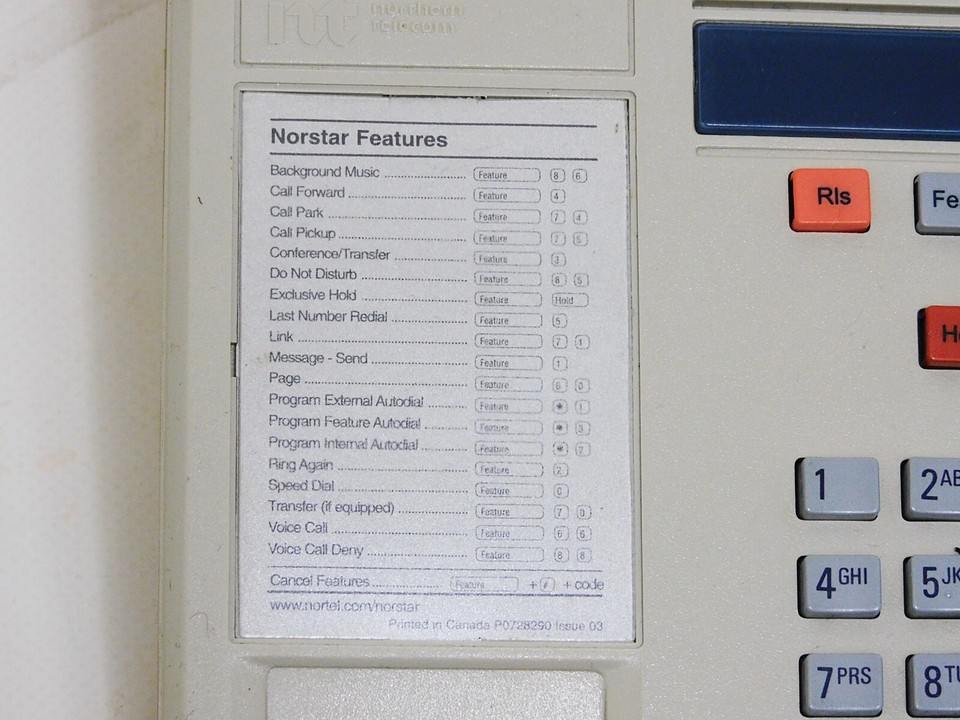
|
M7208 built-in feature card — click to enlarge
|
Each code is shown as a sequence of keys to press on your telephone:
| Feature |
The Feature button on your set |
| 0–9 |
Dial pad digit keys |
| * |
The star / asterisk key |
| # |
The pound / hash key |
| Hold |
The Hold button |
| Rls |
The Release button |
| Intercom |
An Intercom button |
| USER |
Letter keys spelled out on the dial pad |
| Role |
Default |
| Installer |
266344 |
| System Coordinator |
23646 |
| Basic password |
22342 |
Transfer a call:
Feature70
→ Dial ext → Announce → Rls
Blind transfer:
Feature70
→ Dial ext → Hang up immediately
Park & page:
Feature74
(note slot#) →
Feature61
→ Announce slot#
3-party conference:
Call 1 → Hold → Call 2 →
Feature3
→ Press held line button →
Feature3
Forward all calls:
Feature4
→ Dial destination
Cancel call forward:
Feature#4
Check a button’s function:
Feature*0
→ Press any button
Enter system programming:
Feature**
→ Enter Installer or Sys. Coord. password
|
Source: Nortel Norstar Compact ICS Telephone Feature Card, P0881598 Issue 01. Codes are consistent across CICS, ICS, 3x8, and 6x16 platforms unless noted. Consult your system’s documentation for version-specific details.
|
|
|