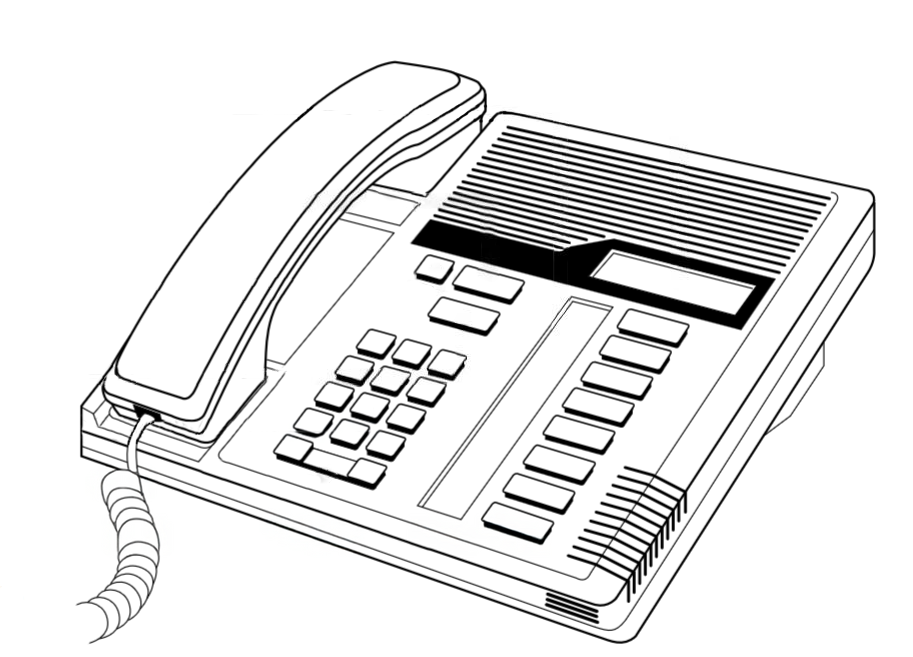
Northern Telecom product illustration
|
|
M7208
M-Series · 8-Button Digital Set
The M7208 is the mid-range model of the Norstar M-Series digital telephone family
and the most widely deployed Norstar set in North America. Its compact footprint,
8 programmable buttons, and 1-line alphanumeric display make it suitable for the
majority of office workstations. The M7208 connects to any Norstar KSU over a
single pair of digital wires and derives all operating power directly from the system,
requiring no local power supply.
| › |
8 programmable line / feature buttons |
| › |
1-line, 16-character alphanumeric display |
| › |
Compatible with all Norstar KSU platforms |
| › |
Single-pair digital station wiring |
| › |
Available in Charcoal and Almond |
| › |
KSU loop-powered — no external power supply |
|
| Model Number |
M7208 |
| Series |
Norstar M-Series |
| Programmable Buttons |
8 — configurable as line appearances, intercom keys, speed dial, or feature access |
| Display |
1-line × 16-character alphanumeric LCD |
| Soft / Display Keys |
None |
| Fixed Keys |
Release (red), Feature (red), Hold (red), Volume Up, Volume Down, dial pad (0–9, *, #) |
| Message Waiting |
LED indicator illuminated by KSU when voicemail or messages are waiting |
| Handset |
Standard NT digital handset with coiled cord |
| Speakerphone |
None — handset operation only |
| Headset Port |
Not present on standard M7208 |
| Ringer |
Adjustable volume and tone (programmable via Feature 1) |
| Station Connection |
Single pair, standard Norstar digital station port (RJ-11 / RJ-45 to 25-pair distribution) |
| Power |
Loop-powered from KSU over station pair — no local AC adapter required |
| Max. Station Cable Run |
Up to 300 m (1,000 ft) on 24 AWG solid copper — see Wiring Reference for full distance table |
| Colour Options |
Charcoal (standard), Almond |
| Desk Stand |
Integrated tilt stand, two positions |
| Wall Mountable |
Yes — handset retainer clip reversible for wall-mount orientation |
| Add-on Modules |
Not supported — see M7324 for CAP / DSS module capability |
| KSU Compatibility |
Norstar 3x8, 6x16, Compact ICS (all versions), Integrated ICS, Modular ICS |
| Interoperability |
Fully interchangeable on same system with M7100, M7310, M7324, T7100, T7208, T7316, T7316e, T7406 |
| Approx. Dimensions |
222 mm × 209 mm × 83 mm (W × D × H with stand) |
| Approx. Weight |
Approx. 0.9 kg |
| Key and Button Reference |
|
| Key / Button |
Type |
Function |
| Buttons 1–8 |
Programmable |
Assignable as: line appearance, intercom (DN) key, speed dial, feature code shortcut, or Answer DN. Each has a dual-LED indicator (red/green) showing line and call state. Default assignment configured by the System Coordinator during installation. |
| Display |
LCD |
1-line × 16-character alphanumeric. Shows the active caller identification, line label, call timer, feature status, and system prompts. The display updates dynamically during feature programming to guide the user step by step. |
| RLS (Release) |
Fixed — red |
Ends the active call and releases the line. Also used to exit from feature programming menus without saving. Equivalent to replacing the handset. |
| Feature |
Fixed — red |
Activates feature code entry mode. Press Feature followed by the feature code number (e.g., Feature 70 for Do Not Disturb). Also the entry point for all user-level and System Coordinator programming. |
| Hold |
Fixed — red |
Places the active call on exclusive hold at this set. The call can only be retrieved from this telephone. The held line button flashes to indicate a held call. For system hold (retrievable by any set), use Feature 83. |
| Volume ▲ |
Fixed |
Increases handset receive volume during a call. Outside of a call, increases ringer volume. Settings are retained after the call ends. |
| Volume ▼ |
Fixed |
Decreases handset receive volume during a call. Outside of a call, decreases ringer volume. |
| Dial Pad |
Fixed |
Standard 12-key touchtone pad (0–9, *, #). Used for dialling, entering feature codes, naming extensions (alpha entry via multi-tap), and navigating programming menus. The * and # keys have special roles in feature programming. |
| MSG Indicator |
LED |
Steady red light indicates a message waiting — typically illuminated by the voicemail system (CallPilot, Flash, etc.) when a new message is present in the mailbox associated with this extension. Press Feature 65 to access messages. |
| |
Note on red keys: The three red fixed keys — Release, Feature, and Hold — are
a distinctive hallmark of the Norstar M-Series design. Their colour distinguishes them at a glance
from programmable buttons and the dial pad, reducing mis-dials during feature programming.
|
| Programmable Button Types |
|
| Assignment Type |
Description |
| Intercom (DN) Key |
Represents the set’s own extension. Used to place and receive internal calls and to originate external calls. At least one intercom key is required per set. |
| Line Appearance |
Direct access to an external trunk line. Pressing the button seizes that line; the LED shows real-time line state (idle, in use, ringing, on hold). |
| Answer DN |
Monitors another extension and allows pickup of calls ringing at that DN. The LED flashes when the monitored extension is ringing. |
| Speed Dial |
One-touch dialling of a stored number. Can be a personal speed dial (user-programmed) or a system speed dial (set by the System Coordinator). |
| Feature Key |
Stores a feature code sequence for single-key activation of a frequently used feature (e.g., Do Not Disturb, Call Forward, or Last Number Redial). |
| Handsfree Answerback |
Enables the set to auto-answer internal voice-announced calls through the handset. Configured by the System Coordinator per set. |
Button assignments are set during system programming using the System Coordinator menu
(Feature ** System Coordinator password). Refer to the
System Coordinator Manual
or the M7208 User Card for button labelling
and programming procedures. A blank button label card is located under the transparent overlay on the left side of the set.
Photographs of the M7208 in charcoal and almond finish, button label card detail, and wall-mount configuration.
[ Photograph — Front View ]
M7208 Charcoal — front
three-quarter view
|
|
Front view — charcoal finish
|
[ Photograph — Front View ]
M7208 Almond — front
three-quarter view
|
|
Front view — almond finish
|
[ Photograph — Button Detail ]
Programmable buttons and
display close-up
|
|
Button label card and display detail
|
[ Photograph — Rear View ]
Rear panel showing line cord
socket, stand positions, and
wall-mount hook
|
|
Rear panel — connectors and stand
|
[ Photograph — Wall Mount ]
M7208 mounted on wall plate
with handset retainer clip
in wall-mount position
|
|
Wall-mount configuration
|
[ Photograph — In Situ ]
M7208 on a typical office
desk installation
|
|
Typical desk installation
|
| Documentation |
|
| Document |
Type |
Open |
| Norstar M7208 User Card |
User Card (NT original) |
Open PDF |
| Norstar M7208 Quick Reference Guide |
Quick Reference |
Open PDF |
| CICS 7.0 System Coordinator Guide |
System Coordinator |
Open PDF |
| Norstar Feature Code Quick Reference |
Reference Page |
Open Page |
| |
Related M-Series Telephone Sets:
M7100 — single-line, 1-line display ·
M7208 — 8 buttons, 1-line display ·
M7310 — 10+10 buttons, 2-line display, display nav keys ·
M7324 — 24 buttons, 2-line display, CAP-capable
|
|
|